Painting with sound
Learn the words for sound and mood, then use them to paint a feeling.
 01
01Objective
Students will be able to describe sounds using precise mood, timbre, and "temperature" vocabulary, and use those words to search the sound library and match sound to picture.
 02
02The big idea
"Happy" and "sad" only get you so far. Filmmakers and sound designers use a rich vocabulary with adjective words like warm, gritty, ethereal, tense etc. to find the exact sound they need. They also treat sound like color: warm colors (orange) feel cozy and nostalgic, cool colors (teal) feel distant or mysterious and sounds have a "temperature" too. Learn the words, then use them to paint a mood onto a video.
Cozy, nostalgic, close. Think orange light and a soft piano.
Distant, mysterious, wide. Think teal and a held string note.
 03
03What you'll need
Soundtrap sound/loop library + favorites/collections
Recommended clip: Flowers
Handout: Sound to color word bank, plus the Sound/color descriptors reference ↗
 04
04Warm-up / hook
5–10 minPlay the recommended clip twice with two different backing sounds — one "warm," one "cool" — and ask students how the same picture felt different. Then a fast "temperature" game: play library sounds, thumbs for warm vs. cool.
 05
05Steps
Learn the words. Walk through the Sound Word Bank (dynamics, timbre, texture).
Temperature sort. Listen to 4–5 library sounds; tag each warm/cool, calm/tense.
Pick a target mood for the recommended clip (e.g., "warm & nostalgic" or "cold & tense").
Search & favorite. Use descriptive words to search the library; collect 4–6 sounds into a favorites collection — your "Mood Palette."
Score the clip with your palette.
Justify each pick with one describing word + one sentence.
"Mood Palette"
Turn in:
 07
07Reflection questions
Record in Soundtrap or writeWhich words led you to the best sounds?
Did any sound feel "warm" or "cool" the way a color does? Which one?
How did your palette change the feeling of the video?
 08
08Extension & scaffolding
A matching game to connect describing words to sounds and save favorites. No scoring required.
Score the same clip twice with opposite palettes (warm vs. cool) and write about how the meaning flips; add the orange/teal cinematography analysis.
 09
09Share / submit
Day 1 = vocabulary + temperature sort; Day 2 = search + build the palette; Day 3 = score + justify.
It's a reference sheet, not a memorization task. Students should be glancing at it constantly.
Students slide back into "happy/sad." Require at least three words from the bank in their justifications.
Endless library scrolling. Set a timer and a target (4–6 sounds) so browsing doesn't eat the period.
The color crosswalk can be anchored with something physical (an orange vs. a blue object, or two contrasting images) before connecting it to sound.
The "same clip, two palettes" scale-up is the strongest version of this lesson if your students can handle it.
One page per student, or project it for the class. Students can also log their palette as a muted audio track in Soundtrap instead of on paper.
Soundtrap for Education · Video Scoring Projects · Project 01. Video scoring v1 uses clips from the Soundtrap video library. External creator videos are linked or embedded only, never re-hosted.
One sound, four worlds
Take a single everyday sound and turn it into four things it's not.
 01
01Objective
Students will be able to record a real-world sound and use audio effects to transform it into multiple new, distinct sounds — then place those sounds against a video to create a mood.
 02
02The big idea
Most of the sounds in your favorite movies aren't "real." Sound designers take ordinary recordings and reshape them into something new — the lightsaber is a projector motor mixed with TV static; Chewbacca is a blend of bear and walrus. The core skill isn't finding the perfect sound; it's transforming one sound into whatever the story needs. Today, you're the sound designer: one recording, four transformations.
 03
03What you'll need
A recording device (Chromebook mic, phone, or laptop)
Soundtrap effects (pitch/speed, reverse, reverb, delay/echo, EQ, distortion, sampler)
Recommended Soundtrap video clip: Kinetic Sand
Handout: Sound Recipe Card
Optional: Chrome Music Lab – Spectrogram ↗ to see your sound's shape change
 04
04Warm-up / hook
5–10 minReference clips: Sound Design 1 ↗ · Sound Design 2 ↗. Then a quick game: play 3 transformed sounds and have students guess the original source ("that 'monster' is actually a…?"). The reveal makes the concept click before any instructions.
 05
05Steps
Record one sound. A pencil tap, zipper, crumpling paper, a door. Keep it short (1–3 seconds).
Import into Soundtrap and duplicate it four times.
Transform each copy with a different effect or combination — pitch down, reverse, reverb, distortion. Listen for the moment it stops sounding like the original.
Name each new sound by what it became ("sci-fi door," "creature growl," "rainstorm," "heartbeat").
Fill in a Recipe Card for each transformation.
Score the clip: open your video of choice and place your four sounds against it to build a 10–15 second mood.
"The Sound Kit"
Turn in a Soundtrap project containing:
This mirrors how professionals actually work by building a "sound palette" and document their effect chains so they can recreate them.
 07
07Reflection questions
Record in Soundtrap or writeWhich transformation surprised you most, and why?
Which effect made the biggest change — the pitch, the space, or the texture?
Which of your sounds changed the mood of the video the most?
 08
08Extension & scaffolding
Find one sound, add just one effect to change its mood, name the result. No recipe card required.
Build a full 15-second scene from your derived sounds (footsteps → door creak → sting), or create one "creature" from three layered transformations.
 09
09Share / submit
Day 1 = hook + record + import; Day 2 = transform + recipe cards; Day 3 = score to the clip + reflect. Can compress to two periods if recording is assigned as a quick warm-up.
Modeling the full workflow once (record → duplicate → add effect → rename).
Recordings that are too long or too noisy. Remind students: 1–3 seconds, quiet room, get close to the source.
Stacking every effect at once turns sound to mush. One effect at a time, listen, then combine.
"It still sounds like a pencil." Pitch-shifting down plus reverb is the fastest route to transformation. Demo that combo live.
Confirm mic access on devices beforehand; Chromebook mics vary in quality.
A small repeatable card, one per transformation. Print a sheet of four, or skip the paper and have students answer it as a muted audio track inside Soundtrap.
Soundtrap for Education · Video Scoring Projects · Project 02. Video scoring v1 uses clips from the Soundtrap video library. External creator videos are linked or embedded only, never re-hosted.
Same shot, two feelings
Prove that sound controls emotion with the same video, twice.
 01
01Objective
Students will be able to explain how sound design shapes emotion in short-form content and film, and demonstrate it by sound-designing one clip two different ways.
 02
02The big idea
Sound is half of what you feel. A silent hallway is nothing; add a low drone and a distant creak and it's terrifying! The picture never changed. Creators use whooshes on cuts, risers before reveals, ambience to build a place, and stingers to punch a moment. Used well (and sparingly), sound turns ordinary footage into something you can't scroll past.
 03
03What you'll need
Soundtrap SFX, loops, and recording
Recommended clip: Downhill Skateboarding or Racing Cars
Handout: Sound-Off / Sound-On Planner
Optional creator references: Full Time Filmmaker on audio ↗ · StudioBinder sound design breakdown ↗
 04
04Warm-up / hook
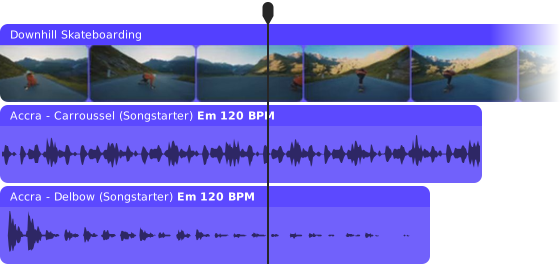
5–10 minWatch the recommended clip on mute, then with sound. Discuss: what changed in how it felt? Nothing on screen changed, only the sound.
 05
05Steps
Watch & compare (mute vs. sound); fill the top of the worksheet.
Learn the toolkit: ambience, SFX (whoosh, riser, stinger, pop), and music plus the rule: reserve SFX for the 3–5 biggest beats so it feels polished, not chaotic.
Choose two target feelings for the recommended clip (e.g., calm vs. creepy).
Version A — sound-design the clip for feeling #1.
Version B — same clip, feeling #2.
Compare & reflect.
"Two-Version Cut"
Turn in the same recommended clip scored two different ways to create two opposite emotions, plus a short note naming the techniques used in each version (ambience, SFX type, music choice).
 07
07Reflection questions
Record in Soundtrap or writeWhich sounds did the heaviest lifting?
Where were you tempted to overdo it and did you hold back?
Which version would stop someone from scrolling, and why?
 08
08Extension & scaffolding
One version only, but add 3 sounds to give the clip a clear feeling.
Design for a specific format (a scary-movie trailer vs. a travel ad), or A/B test both versions on classmates and report which one "worked" and why.
 09
09Share / submit
Day 1 = mute-vs-sound comparison + toolkit; Day 2 = build Version A; Day 3 = build Version B + compare.
Play the clip on mute, let students react, then play it with sound. The surprise is the lesson; narrating it first kills the effect.
Overloading SFX. The "3–5 beats" rule is the entire discipline of this lesson. Enforce it or projects turn into noise.
The two versions that come out too similar require the target feelings to be genuine opposites (calm vs. tense), not two shades of the same thing.
"Louder = better" thinking that silence and restraint are also choices a sound designer makes.
The classmate A/B test (scale-up) makes a great whole-class wrap and vote on which version "worked" and have students defend why.
One page per student, planning both versions side by side. Works just as well as a muted audio track in the Soundtrap project.
Soundtrap for Education · Video Scoring Projects · Project 03. Video scoring v1 uses clips from the Soundtrap video library. External creator videos are linked or embedded only, never re-hosted.
Decode the score
Learn to hear what the composer wants you to feel.
 01
01Objective
Students will be able to identify instrumentation, recurring melody, and dynamics in famous film cues and explain how each choice shapes what the audience feels.
 02
02The big idea
When Darth Vader walks in, you feel it before you see him. That's two notes doing the work of a whole paragraph. Composers make deliberate choices: which instruments, which melody, when to go silent. A cue (the music written for one scene) is an argument about how you should feel, and today students learn to hear the argument being made.
 03
03What you'll need
2–3 short film score clips, played in class: John Williams' Imperial March ↗, Ludwig Göransson's Mandalorian theme ↗, and Hans Zimmer's Interstellar ↗
Soundtrap
Projector/speakers
Handout: Listening Journal
 04
04Warm-up / hook
5 minHum three famous themes (or play 2-second snippets) and have students shout out the movie. Then the question that frames the lesson: how did two notes just tell you a whole story?
 05
05Steps
Play the first cue. Students note: what instruments? When does it get louder, faster, quieter?
Play it again. Listen for one melody that repeats. When does it come back, and what's happening on screen when it does?
Repeat with the second cue.
Students complete the Listening Journal audio response in Soundtrap comparing their two favorite cues.
Class discussion: each cue wants you to feel something. Which one does its job better?
"The Listening Journal"
Turn in a completed two-cue comparison:
Recordable as an audio response in Soundtrap instead of written.
 07
07Reflection questions
Record in Soundtrap or writeHow would the scene feel with no music at all?
Why do you think the composer picked these instruments instead of others?
What's one trick you heard that you want to steal for your own scoring?
 08
08Extension & scaffolding
One cue, three questions: what instruments, is it happy or scary, how do you know?
Compare two cues from the same composer and identify their signature moves; or research the composer and present one fact about how the cue was made.
 09
09Share / submit
One period is enough: 5 min hook, 20 min listening across two cues, 10 min journal, 10 min discussion.
The first listen is reaction, the second is analysis. Students rarely hear the repeating melody on one pass.
"It sounds cool" answers. Push every claim back to a detail: which instrument, which moment.
Clips that run too long. Thirty to sixty seconds is plenty for one cue.
Stream or link commercial cues for class listening. Student submissions should be their own writing, recording, or original music.
One page per student, two cues side by side. This one is built to be answered out loud: record it as a muted audio track in Soundtrap instead of printing.
Soundtrap for Education · Video Scoring Projects · Project 04. Video scoring v1 uses clips from the Soundtrap video library. External creator videos are linked or embedded only, never re-hosted.
The musical name tag
Compose a theme so recognizable, we know who's coming before they arrive.
Run this straight after Decode the score — students reuse the listening vocabulary from that lesson to build their own theme.
 01
01Objective
Students will be able to compose an original 4–8 bar leitmotif that expresses a character's personality through instrument choice, tempo, and melody, and revise it to reflect a story change.
 02
02The big idea
A leitmotif (LITE-moh-teef) is a musical name tag. Darth Vader has one. Indiana Jones has one. Hear it, and you know who's coming. The trick isn't writing a long piece of music; it's writing a few notes so specific to a character that the audience learns their name in sound. Today every student gives a character their sound.
 03
03What you'll need
Soundtrap instruments and loops (MIDI editor for scale-up)
Optional: character prompt cards (the brave knight, the sneaky thief, the lost robot)
Callback: themes discussed in Decode the score
Handout: Name Tag planner
 04
04Warm-up / hook
5 minPlay two famous motifs back to back. Ask: which one is the villain? How do you know in under three seconds? List the clues on the board: instrument, speed, high or low.
 05
05Steps
Choose a character: from a book you're reading, a movie you love, or your own imagination.
Decide who they are in sound. Bold or sneaky? Fast or slow? What instrument sounds like them?
Compose an original motif, about 4–8 bars (a bar is one measure of musical time; the Studio timeline counts them for you).
Test it: play the motif for a classmate. Can they describe your character from the music alone?
Revise based on what they heard versus what you meant.
"The Name Tag"
Turn in a Soundtrap project with the original motif plus a one-line character description, so the teacher can check whether the music matches the intent.
 07
07Reflection questions
Record in Soundtrap or writeWhat did your classmate get right about your character just from the music? What did they miss?
Which single choice (instrument, speed, melody) did the most work?
Where in a movie would your motif play for the first time?
 08
08Extension & scaffolding
Pick the character card, pick one instrument that "is" them, and record a short melody. No bar count required.
Thematic transformation: rework the motif for the character's worst moment, slower, quieter, minor chords (the sad-sounding ones). Same melody, new feeling. If it still sounds like your character but feels completely different, it works.
 09
09Share / submit
One period: 5 min hook, 10 min character and planning, 20 min composing, 10 min partner test and revision. Add a second period for the thematic transformation.
"I can't think of a character" is the biggest time sink. A stack of cards keeps everyone composing within the first five minutes.
Motifs that never end. Cap it at 8 bars and make students hum it before they build it.
Loop stacking instead of melody writing. The motif has to be a tune someone can sing back.
Copying a famous theme. Use the references for structure, then change the notes.
Run this straight after Decode the score, and keep the motifs. Project 06 uses them as trailer themes.
One page per student: character, sound personality, melody shape, and the partner test. Or record the same answers as a muted audio track in Soundtrap.
Soundtrap for Education · Video Scoring Projects · Project 05. Video scoring v1 uses clips from the Soundtrap video library. External creator videos are linked or embedded only, never re-hosted.
The trailer cut
Everything you've learned, one trailer, full soundtrack.
Run this last — it uses the leitmotifs students composed in The musical name tag as the trailer's theme.
 01
01Objective
Students will be able to produce a complete trailer soundtrack that combines an original leitmotif, a tension build, sync points on key cuts, sound effects, and a balanced mix.
 02
02The big idea
Trailer music is its own art form: two minutes to introduce a hero, build a world, and land the biggest moment of the movie on one cut. It takes everything at once — theme, tension, sound design, mix. Students have built each of those skills separately. This is where they find out the skills were always one job.
 03
03What you'll need
One muted video in the Soundtrap studio: Jumping Scout or any imported clip of their choice
Student leitmotifs from The musical name tag
Soundtrap loops, instruments, and SFX
Handouts: Trailer Map and the rubric (motif use, sync accuracy, mood control, mix quality)
 04
04Warm-up / hook
5–10 minPlay a trailer everyone knows, audio only, screen off. Have students call out what they "see." Then ask: how much of that movie was actually the sound?
 05
05Steps
Map before you compose. Watch the muted trailer several times and mark the big cuts, where the music should build, and the one moment that needs a sync point.
Lay in your leitmotif from the last lesson as the trailer's theme.
Build the ramp: louder, faster, more instruments as the trailer escalates.
Land your sync points on the biggest cuts.
Layer in SFX and ambience (background sound like wind or city noise) to complete the world.
Mix: adjust each track's volume so nothing drowns anything out.
"The Trailer Cut"
Turn in the finished Soundtrap project:
Portfolio-worthy.
 07
07Reflection questions
Record in Soundtrap or writeWhich sync point are you proudest of, and what happens on screen there?
How did your motif change from the last lesson once it had to work inside a trailer?
What did you fix in the mix, and how did you notice it was broken?
 08
08Extension & scaffolding
Teacher pre-marks the sync points; students choose from curated loop folders and add two SFX.
Compose a second version for a different genre (score the same trailer as horror, then comedy), or write a one-paragraph composer's statement defending three choices.
 09
09Share / submit
Day 1 = hook + map the trailer; Day 2 = theme, build, and sync points; Day 3 = SFX, ambience, mix, and screening day.
It assumes students already have a motif and some sound-design instincts. Without those, it turns into a loop-stacking exercise.
Composing before mapping. Insist on the marked cuts first; it saves a whole period of rework.
A build with nowhere to go. If it's loud at 10 seconds, there's nothing left for the reveal.
Skipping the mix. Teach one pass with headphones where students only touch volume.
Peer feedback works best with the rubric in hand and the pack vocabulary on the board.
The Trailer Map is one page per student for marking cuts, the build, and sync points. The rubric is the shared page used across all six projects.
Soundtrap for Education · Video Scoring Projects · Project 06. Video scoring v1 uses clips from the Soundtrap video library. External creator videos are linked or embedded only, never re-hosted.
One handout per project — a Sound to Colour word bank, Sound Recipe Cards, the Sound-Off / Sound-On Planner, a Listening Journal, the Name Tag planner and the Trailer Map — plus a page on how to use them. Print only the pages a lesson needs; each one says whether it is per student, per class, or a cut-apart card.
How to use these handouts

Every handout in this pack can be answered out loud instead, right inside the Soundtrap project. Students record their answers on a separate track, name that track after the handout (for example "Sound Recipe Card" or "Listening Journal"), and mute it so it doesn't play with the score. When you open the project, unmute the track and listen to their thinking.
Paper works. Audio works. Some students will do their best explaining out loud, so let them.
| Project | Handout | Form factor |
|---|---|---|
| 01 Painting with sound | Sound to color word bank | One per student, or project it for the class |
| 02 One sound, four worlds | Sound Recipe Card | Small cut-apart card, four per sheet, one per transformation |
| 03 Same shot, two feelings | Sound-Off / Sound-On Planner | One worksheet per student |
| 04 Decode the score | Listening Journal | One worksheet per student, built for an audio response |
| 05 The musical name tag | Name Tag planner | One worksheet per student |
| 06 The trailer cut | Trailer Map | One worksheet per student |
| All six | Universal rubric | One shared page, kept separately |
Sound Recipe Cards
Cut along the lines. Fill in one card per transformed sound. Print as many sheets as you need, or record the same four answers on a muted "Sound Recipe Card" track.
Sound to color word bank
Sound-Off / Sound-On Planner
Reserve SFX for the 3–5 biggest beats. Both versions use the same clip and the same cuts, only the sound changes.
Listening Journal
This one is built to be spoken. Answer on paper, or record it as a muted "Listening Journal" track in Soundtrap.
Name Tag planner
Draw the melody as a line that rises and falls, or write note names. Notation is welcome but optional.
Trailer Map
Map it before you compose. Mark the big cuts, where the music builds, and the one moment that needs a sync point.
One rubric for all six projects. Five criteria — craft, sound and picture, creative choices, documentation and reflection — each scored 1 to 4, with space for student, class, project and date. Download the PDF to print one per student, or score it on screen.
Universal rubric
| Criteria | 4 · Sounds professional | 3 · Meets the brief | 2 · Getting there | 1 · Just started |
|---|---|---|---|---|
| Craft recording, editing, mix balance |
Clean audio, deliberate levels, nothing clipping or buried. | Audio is clear and levels are mostly balanced. | Some noise or one layer drowning the rest. | Hard to hear what is going on. |
| Sound and picture does the audio serve the clip? |
Sound lands on the right moments and changes how the clip reads. | Sound fits the clip and hits the main moment. | Audio plays alongside the clip but timing is loose. | Sound and picture feel unrelated. |
| Creative choices risk, originality, personality |
Takes a real swing and it works. Choices feel authored. | Clear choices with some personality. | Safe, mostly default sounds. | First option kept, no exploring. |
| Documentation handout or muted audio response, naming, tidiness |
Handout or audio response complete, tracks named, anyone could rebuild it. | Handout or audio response done and tracks mostly named. | Handout partly done, naming inconsistent. | Missing handout or audio response, or unnamed tracks. |
| Reflection can they explain the choices? |
Uses specific sound vocabulary and names cause and effect. | Answers all questions with reasons. | Short answers, mostly describing what happened. | Little or no reflection. |